





Build Real Smart Devices: India's Most Hands-On IoT Course for School Students

10,000+ school students trained across India

Built by IIT & industry-experienced engineers
Built by IIT & industry-experienced engineers

70% practical learning — no boring lectures

Industry-recognised certificate of completion
Program Highlights
Start Your Learning Journey With Confidence
- Course Overview
- Course Objective
- Learning Outcomes
- Who Should Enroll
- Course Features
- Industry & Job Connect
Why Module 2 Matters in 2026
Every connected device you use — your smartwatch, your air purifier, your delivery tracker — runs on the same four-layer stack: a sensor, a microcontroller, a wireless link, and a cloud service. By 2030, there will be more than 30 billion connected devices on the planet. The engineers, founders and product leaders behind them are being trained today. Module 2 of Electrobot Senior is where that training begins for an ambitious school student in India.
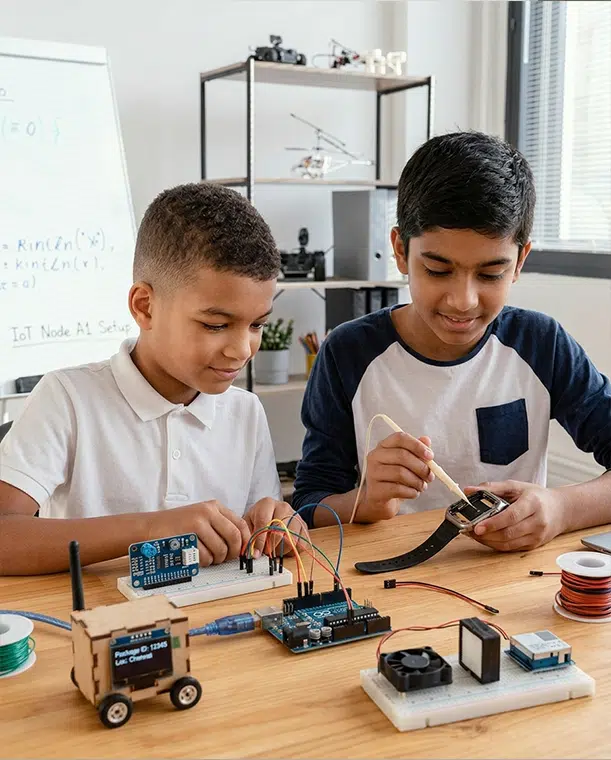
In this 45-day module, students step beyond local Arduino circuits and step into the world of Internet of Things. They learn how to make a sensor talk to the cloud, how a smartphone app can control a relay from another city, how LoRa radios send farm data across kilometres without WiFi, and how a fleet of devices is monitored on a dashboard like the ones used in real factories. By Day 45, each student has built a complete, multi-node smart agriculture system that mirrors commercial AgriTech products.
What Makes This Course Different
• Real industrial protocols — MQTT, HTTP REST, BLE, LoRa, GSM — taught with working hardware, not theory slides.
• ESP32 first approach — students master the same chip used by leading IoT product companies.
• Cloud dashboards on day one — Blynk, ThingSpeak, Node-RED, and a guided AWS IoT Core introduction.
• Mobile app integration with MIT App Inventor — students literally control their devices from their own phone.
• A capstone project — Smart Agriculture Monitoring System — that is portfolio-grade and demo-ready.
• Direct industry mapping into Agriculture, Manufacturing, Defence and Transport sectors.
Real-World Use Cases Embedded in the Module
| Industry | What You Build in This Module | Real Product It Mirrors |
|---|---|---|
| Agriculture | Cloud-connected smart irrigation system | Commercial AgriTech farm-monitoring kits |
| Manufacturing | Factory sensor dashboards with MQTT | Industrial SCADA telemetry |
| Smart Cities | Air quality monitor with mobile alerts | Government AQI sensing networks |
| Transport | Long-range GPS asset tracker | Logistics & cold-chain fleet trackers |
| Consumer | BLE-controlled smart fan with scheduling | Connected home appliances |
| Defence | Encrypted field telemetry over LoRa | Tactical sensor networks |
By the end of this 45-day module, every learner will be able to demonstrate the following clearly defined, measurable engineering competencies.
















Module 2 is designed for curious, motivated school students who want to step beyond toy circuits into the world of real connected products. While this is a school-level course, the skills covered are the same ones tested in entry-level IoT engineering interviews.

Prerequisites
- Completion of Electrobot Senior Module 1, OR equivalent experience with Arduino and basic sensors.
- Familiarity with reading and writing simple C/C++ sketches in the Arduino IDE.
- Access to a laptop with at least 8 GB RAM and a stable internet connection.
- Ownership of an Android smartphone (recommended for MIT App Inventor labs).
- Curiosity, patience, and the willingness to debug when things break — they will.
| Learner Profile | Why This Course Fits | Outcome After 45 Days |
|---|---|---|
| Grade 9-12 students who completed Module 1 | Natural progression from local Arduino projects to internet-connected devices. | Cloud-connected capstone + GitHub portfolio. |
| School robotics & ATL club members | Brings club projects online with dashboards and mobile control. | Ready to lead state-level IoT competitions. |
| Self-taught Arduino tinkerers | Provides structure, mentorship and industry-grade tools. | From hobbyist to genuine product builder. |
| Aspiring engineering students | Strong portfolio asset for JEE supplementary applications and global universities. | Demonstrable proof of engineering aptitude. |
| Young entrepreneurs & founders | Capstone can evolve into an MVP for a real AgriTech or SmartCity startup. | First viable hardware product concept. |
| STEM enthusiasts curious about Industry 4.0 | Direct exposure to the same stack used in smart factories. | Vocabulary and skills of a junior IoT engineer. |
Every feature listed here is built into the standard fee — no surprise add-ons, no premium tier confusion.
| Feature | What You Actually Get |
|---|---|
| Live Projects | 15 hands-on lab experiments, each mapped to a real industry use case. |
| Mini Projects | 4 industry-focused mini projects executed in pairs or solo with mentor review. |
| Capstone Project | 10-day Smart Agriculture Monitoring System — multi-node, cloud-connected, dashboard-driven. |
| Industry Mentorship | Live mentor sessions with working IoT engineers and AgriTech founders. |
| Certificate of Completion | Industry-recognised Elysium certificate plus stage badge: Certified IoT & Cloud Innovator. |
| LMS & Course Portal | Lifetime access to lab manuals, code repositories, schematics and recorded sessions. |
| Downloadable Resources | Lab logbook templates, BOM sheets, schematic libraries, sample dashboards. |
| Internship Support | Curated openings via Elysium Industry Partner Network for top performers. |
| Interview Preparation | Mock viva, technical interview drills, and project presentation coaching. |
| Community Access | Private Discord / Telegram with alumni, mentors and recruiting partners. |
| Doubt Clearance | Daily doubt slots plus async support via the community channel. |
| Hardware Kit | Optional bundled hardware kit covering ESP32, LoRa, sensors, GSM and accessories. |
| Career Counselling | 1:1 session for college applications, engineering stream choice and scholarships. |
| Parent Reports | Monthly progress dashboards for parents with project artefacts and trainer notes. |

What we don't promise
Hiring Industries
| Sector | Active IoT Hiring Areas in India & Globally |
|---|---|
| Agriculture / AgriTech | Precision farming startups, irrigation IoT, livestock tracking, climate-smart agriculture |
| Manufacturing | Industry 4.0, factory floor telemetry, predictive maintenance, OEE dashboards |
| Smart Cities | Air quality networks, smart parking, water management, street-lighting IoT |
| Healthcare | Connected medical devices, remote patient monitoring, wearable health tech |
| Automotive & EV | Connected cars, fleet telematics, EV battery monitoring, telematics dashboards |
| Energy & Utilities | Smart grid, smart meters, solar IoT, demand-response platforms |
| Logistics | Cold-chain monitoring, asset tracking, warehouse IoT, last-mile delivery |
| Defence | Surveillance sensor networks, soldier wearables, tactical communications |
| Consumer Electronics | Smart home, wearables, audio devices, connected appliances |
| Retail | Smart shelves, footfall analytics, inventory IoT, connected POS |
Job Roles This Module Prepares You For (Long-Term)
| Job Role | Typical Entry Path |
|---|---|
| IoT Engineer | Engineering degree + internship + this skill stack |
| Embedded Firmware Engineer | ECE / EEE / CSE + hands-on portfolio |
| IoT Solutions Architect | Engineering + 4-6 years experience |
| Edge Computing Engineer | Engineering + edge AI specialisation |
| Cloud IoT Developer | CSE/IT + cloud certifications |
| Industrial IoT (IIoT) Engineer | ECE + automation domain knowledge |
| AgriTech IoT Specialist | Engineering + agriculture / agritech exposure |
| Smart City Solutions Engineer | Engineering + civic tech |
| Robotics & IoT Engineer | Engineering + robotics specialisation |
| Wireless Communication Engineer | ECE + RF / wireless specialisation |
| IoT Product Manager | Engineering + product management + MBA optional |
| IoT Cybersecurity Analyst | Engineering + security certifications |
| Hardware Design Engineer | ECE + PCB design specialisation |
| Connected Devices QA Engineer | Engineering + test automation |
| IoT Startup Founder | Engineering + entrepreneurship |
| Field Application Engineer | Engineering + product evangelism |
| DevOps for IoT | CSE/IT + cloud infrastructure |
| Data Engineer for IoT Platforms | CSE + big-data tooling |
| Wearables Engineer | Engineering + low-power design |
| Drone & IoT Integration Engineer | Engineering + drone certifications (Module 4) |
Salary Snapshot (India, Indicative)
| Role | Fresher Range (₹ LPA) | Mid-Senior Range (₹ LPA) |
|---|---|---|
| Embedded / IoT Engineer | 4 – 8 | 12 – 28 |
| IoT Cloud Developer | 5 – 9 | 14 – 30 |
| Industrial IoT Engineer | 5 – 10 | 16 – 35 |
| IoT Solutions Architect | — | 25 – 60 |
| IoT Product Manager | — | 20 – 55 |
Career Pathway
Stage-Wise Progression
| Stage | Where Module 2 Fits | Next Step |
|---|---|---|
| Beginner | Module 1 — Advanced Arduino & Embedded Foundations completed. | Strengthen breadboard, sensors, embedded C. |
| Intermediate (You Are Here) | Module 2 — IoT, Wireless, Cloud. Building cloud-connected systems. | Move to robotics & AI vision in Module 3. |
| Advanced | Modules 3 & 4 — Robotics, AI, Drones & PCB design. | Apply for Embedron college programme. |
| Pre-College | National hackathons, ATL competitions, internships. | Strengthen portfolio and apply for top engineering colleges. |
| College | Engineering degree + Embedron + Embedron+ programmes. | Industry internships in IoT / robotics / AI. |
| Industry | EmbedX industry programme + first job. | Senior engineer, founder or specialist. |
Internal Skill Ladder Within Module 2
| Week | Skill Level Reached |
|---|---|
| Week 1 | Can build a WiFi-enabled ESP32 web server with sensor data. |
| Week 2 | Can publish data to MQTT broker and visualise it in Node-RED. |
| Week 3 | Can architect a multi-sensor cloud dashboard with alerts. |
| Week 4 | Can build a mobile app that controls a real hardware device. |
| Week 5 | Can build a 1 km wireless link and SMS-alert system. |
| Week 6 | Can integrate and demo a complete multi-node IoT product. |
| Week 7 | Can pitch, demo and document the project at startup standard. |
Future Technology Roadmap
Emerging Technologies You'll Be Ready For
- AIoT — combining IoT data with on-device machine learning.
- TinyML — running models on microcontrollers like ESP32.
- Edge Computing — processing data near the sensor, not in the cloud.
- Digital Twins — virtual replicas of physical IoT systems.
- 5G and NB-IoT — next-generation connectivity for massive IoT deployments.
- Blockchain for IoT — secure, tamper-proof device identity.
- Smart Sustainability — energy-aware IoT, solar nodes, carbon dashboards.
| Time Horizon | Recommended Path | Why It Matters |
|---|---|---|
| Immediately After | Move to Module 3 — Robotics & AI Vision. | Combine connectivity with autonomy and intelligence. |
| Within 6 Months | Compete in national IoT hackathons and ATL Marathon. | Validates skills and adds national-level recognition. |
| By Grade 12 | Complete all 4 modules and earn Elysium Innovator's Medal. | Strongest possible school-leaving engineering portfolio. |
| After Grade 12 | Enter Elysium Embedron — College Programme. | Bridges school portfolio to college-grade product engineering. |
| During College | Embedron+ and industry internships. | Real working experience in IoT product companies. |
| After College | EmbedX Industry Programme + first full-time job. | Smoother transition from learner to engineer. |
| Long Term (Year 6+) | Specialise — IoT Security, Edge AI, IIoT, AgriTech, Smart Cities. | Become a recognised expert or domain founder. |
Detailed Syllabus
Weekly Roadmap at a Glance
| Time Horizon | Recommended Path | Why It Matters |
|---|---|---|
| Immediately After | Move to Module 3 — Robotics & AI Vision. | Combine connectivity with autonomy and intelligence. |
| Within 6 Months | Compete in national IoT hackathons and ATL Marathon. | Validates skills and adds national-level recognition. |
| By Grade 12 | Complete all 4 modules and earn Elysium Innovator's Medal. | Strongest possible school-leaving engineering portfolio. |
| After Grade 12 | Enter Elysium Embedron — College Programme. | Bridges school portfolio to college-grade product engineering. |
| During College | Embedron+ and industry internships. | Real working experience in IoT product companies. |
| After College | EmbedX Industry Programme + first full-time job. | Smoother transition from learner to engineer. |
| Long Term (Year 6+) | Specialise — IoT Security, Edge AI, IIoT, AgriTech, Smart Cities. | Become a recognised expert or domain founder. |
Week 1 — ESP32 & WiFi Foundations
Topics Covered
• Differences between Arduino Uno, ESP8266 and ESP32
• Setting up ESP32 board package in Arduino IDE and PlatformIO
• WiFi station (STA) and access point (AP) modes
• HTTP request methods: GET, POST, PUT, DELETE
• Building a custom HTML web server on ESP32
• Introduction to Over-the-Air (OTA) firmware updates
• Reading analog and digital sensors with ESP32
Practical Exercises
• Connect to home WiFi and print IP to serial monitor
• Build a WiFi web server that streams live sensor data
• Push first OTA firmware update wirelessly
• Read DHT22 + ESP32 ADC and display values on a browser
Assignment
Mini Project
Learning Outcome
Industry Application
Week 2 — MQTT & Real-Time IoT
Topics Covered
• MQTT brokers: Mosquitto, HiveMQ, EMQX
• MQTT topics, wildcards and hierarchical design
• Quality of Service (QoS 0, 1, 2) and when to use which
• Retained messages and Last Will & Testament (LWT)
• Securing MQTT with username/password and TLS basics
• Introduction to Node-RED for flow-based dashboards
• JSON payload design — keys, schema, versioning
Practical Exercises
• ESP32 publishes sensor data to broker.hivemq.com
• Subscribe in MQTT.fx and observe live messages
• Build a Node-RED flow with gauges and charts
• Implement QoS 1 with delivery confirmation logging
Assignment
Mini Project
Learning Outcome
Industry Application
Week 3 — Cloud Platforms & Dashboards
Topics Covered
• ThingSpeak: time-series data, channels, MATLAB analytics integration
• Introduction to AWS IoT Core — devices, things, certificates, policies
• REST APIs and webhook patterns for cloud integration
• Dashboard design principles: clarity, hierarchy, alerts
• Grafana for time-series visualisation
• Data privacy, GDPR considerations for IoT
Practical Exercises
• Push 24-hour sensor history to ThingSpeak and visualise trends
• Register an ESP32 as a Thing on AWS IoT Core
• Set up secure MQTT with X.509 certificates
• Create a Grafana dashboard reading from MQTT or InfluxDB
Assignment
Mini Project
Learning Outcome
Industry Application
Week 4 — Mobile App Integration
Topics Covered
• BLE GATT services and characteristics
• MIT App Inventor — designer, blocks, packaging APK
• BLE pairing and reconnection strategies
• Sending and receiving structured data from a mobile app
• Designing UX for IoT control apps
• Introduction to Flutter for advanced learners (preview only)
Practical Exercises
• Create a MIT App Inventor app that scans and connects
• Toggle an LED, then a relay, from the mobile app
• Send slider values to control PWM brightness wirelessly
• Save schedules in ESP32 EEPROM from the app
Assignment
Mini Project
Learning Outcome
Industry Application
Week 5 — Long-Range Wireless & Low Power
Topics Covered
• LoRa point-to-point versus LoRaWAN architectures
• GSM/GPRS fundamentals and AT command interface
• SIM800L module: voice, SMS, GPRS, current-draw realities
• Power budgeting: active, idle, sleep, deep-sleep currents
• Battery chemistries: 18650 Li-ion, LiPo, NiMH
• Solar charging basics with TP4056 + boost converter
Practical Exercises
• Field test 1 km LoRa range in an open area
• Send threshold-triggered SMS from SIM800L on Arduino
• Run ESP32 in deep-sleep, wake on timer every 30 minutes
• Measure current with a USB power meter at each sleep state
Assignment
Mini Project
Learning Outcome
Industry Application
Week 6 — Capstone: Smart Agriculture Monitoring System
Topics Covered
• Edge logic versus cloud logic — where to compute what
• Failsafe design: what happens when the cloud goes down
• Energy harvesting and field-grade enclosures
• Cybersecurity hardening for the capstone
• Project documentation and version control workflows
Practical Exercises
• Configure the gateway as MQTT publisher to ThingSpeak
• Implement rule engine: dry soil → pump on, extreme temp → SMS alert
• Design a multi-zone Node-RED dashboard with 24-hour graphs
• Conduct a full system test in a controlled garden or campus area
Assignment
Mini Project
Learning Outcome
Industry Application
Week 7 — Showcase, Pitch & Final Assessment
Topics Covered
• Slide design fundamentals for technical demos
• Handling questions and feedback gracefully
• Building a public GitHub README that recruiters trust
• Recording a polished 3-minute demo video
Practical Exercises
• Record a final demo video using a smartphone
• Final viva-voce with two trainers
• Peer review using a structured rubric
• Capstone exhibition for parents and external mentors
Assignment
Mini Project
Learning Outcome
Industry Application
Week-by-Week Module Documents
Curriculum Framework
| Pillar | What It Means | How It Appears in Module 2 |
|---|---|---|
| Discover | Concept introduction with demonstrations and real-world context. | Industry case studies, live MQTT trace demos, founder guest sessions. |
| Design | Block diagrams, architecture sketches, system thinking. | Topic hierarchies, JSON schema design, cloud-vs-edge logic mapping. |
| Develop | Hands-on coding, wiring, sensor integration. | Daily ESP32 labs, Node-RED flows, mobile app blocks. |
| Deploy | Working prototypes, demos, field tests. | 1 km LoRa field test, full capstone system test, demo day. |
| Disrupt | Innovation, improvement cycles, startup pitch. | Capstone pitch, business model canvas, peer-judged showcase. |
Theory–Practical Distribution
| Component | Daily Time | Activity Examples |
|---|---|---|
| Theory (30%) | ≈ 27 minutes | Concepts, protocols, architectures, security primitives, design principles |
| Practical (70%) | ≈ 63 minutes | Labs, coding, hardware interfacing, debugging, projects, demos |
Assessment Structure
| Component | Weightage | Description |
|---|---|---|
| Practical Lab Assessment | 30% | Daily lab logbook quality, dashboard work, sensor-to-cloud chains. |
| Capstone Project Evaluation | 30% | Working multi-node prototype, dashboard, mobile element, demo. |
| Viva-Voce | 15% | Theory on MQTT, WiFi, LoRa, cloud platforms and IoT security. |
| Assignments & Quizzes | 10% | Concept checks, JSON design tasks, cloud-account assignments. |
| Attendance & Participation | 10% | Engagement, peer support, classroom presence. |
| Innovation Score | 5% | Originality — cloud rules, security features, energy optimisations. |