





Build Cloud-Connected IoT Products in 45 Days. Walk Out Internship-Ready.

70% Hands-On • 30% Theory — no death-by-slides

Live capstone reviewed by industry mentors from Tata Elxsi, Bosch, Ola Electric

Internship-Ready certificate from Elysium Embedded School

2-student-per-bench ratio, real ESP32 + Pi + LoRa kits, take-home portfolio

Module Completion Certificate from Elysium Embedded School

Urgency / Scarcity Strip
Program Highlights
Start Your Learning Journey With Confidence
- Course Overview
- Course Objective
- Learning Outcomes
- Who Should Enroll
- Course Features
- Industry & Job Connect
There is a quiet shift happening across India's industrial floor right now. Pumps, motors, conveyors and tractors are quietly growing antennas, sending their heartbeats to dashboards in Bangalore, Pune and Chennai. The people who can wire that up — sensor, firmware, cloud, mobile app — are being paid handsomely to do it, and most engineering colleges are still teaching the syllabus from 2014.
Embedron+ Module 2 was built to close that gap. It is the second of four modules in our flagship intermediate program for B.E. and B.Tech students, but it is also the first module where you ship a complete, sellable product. Across 45 days, you will move from a single ESP32 blinking an LED to a multi-node, LoRa-meshed, cloud-secured, mobile-app-controlled system that any product manager in the country would recognise as the real thing.
The pedagogy is deliberate. Each 90-minute session opens with a 15-minute concept briefing, drops you into a 45-minute lab, and ends with a debug huddle and logbook entry. There is no abstract lecturing. You touch the protocol — MQTT, LoRa, BLE, OPC-UA — before you read about it. By Week 6 you are arguing about TLS cipher suites without prompting, because you have just watched a clear-text MQTT packet getting sniffed off the air.
Why This Course Matters Right Now
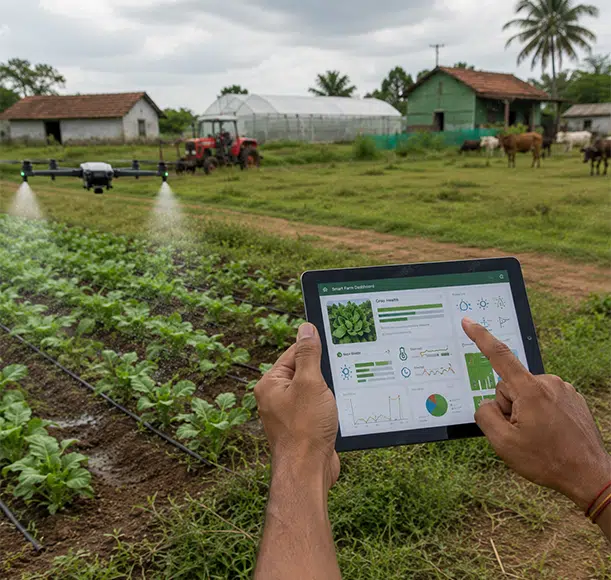
India's IoT market is projected to cross USD 9.3 billion by 2025, with industrial deployments leading the surge. NASSCOM places IoT and Edge AI among the top five hiring sectors for fresh engineers. Companies like Stellapps, CropIn, Ather, Ola Electric, Tata Elxsi, L&T Technology Services and a long tail of MSMEs are hiring for one specific person: someone who can take a sensor reading, route it through a wireless link, land it in a cloud database, and surface it on a phone — securely, reliably, at scale. This is exactly that person. Module 2 produces them in 45 days.
From Beginner to Builder — Your 45-Day Arc
Week 1, you wire up Wi-Fi and watch your ESP32 reach the internet for the first time. Week 2, you bring up an MQTT broker, secure it with TLS, and watch your data appear on a ThingsBoard dashboard. Week 3, you stand on the campus lawn with two LoRa nodes and measure how far the signal really reaches. Week 4, you bring up a Raspberry Pi as a gateway, install Node-RED and InfluxDB, and start designing alerts. Week 5, you open Flutter for the first time and build a phone app that talks to your hardware. Week 6, you break your own system on purpose and learn how to harden it. Then you ship the capstone.
Real-World Use Cases You Will Build
- A LoRa-connected soil moisture network for a 1-acre farm with mobile alerts.
- A motor health node streaming current and vibration data to a Grafana dashboard with anomaly alarms.
- A perimeter sensor mesh with TLS-encrypted MQTT and dead-man telemetry.
- A vehicle telemetry tracker publishing GPS and harsh-event data to a fleet map.
- A signed OTA pipeline that pushes new firmware to a deployed device over HTTPS.
By the end of Module 2, every learner should be capable of doing the following without supervision.











Outcomes are framed in measurable language so that hiring managers, internship coordinators and accreditors can verify them objectively.
Technical Skills
- Implement at least 6 production-grade communication protocols (Wi-Fi, BLE, MQTT, HTTP/REST, LoRa, OPC-UA basics).
- Build and deploy 4 working IoT prototypes across the module, all available on a public GitHub portfolio.
- Demonstrate sub-second latency on a phone-to-device control loop over BLE and over MQTT-on-Wi-Fi.
- Pass a 24-hour soak test on the capstone device with zero data loss and automatic reconnect.
Engineering Skills




Industry & Career Readiness


This course is built for a specific kind of learner — someone who has touched a microcontroller before and is now hungry to take a product from the bench to the cloud to a customer's phone.
Ideal Fit
Equally Welcomed
- 2nd, 3rd and 4th-year B.E./B.Tech students — ECE, EEE, CSE, IT, Mechatronics, AI&DS — looking for an internship in the next 4 to 6 months.
- Final-year project teams — students who want a capstone project that will actually impress a placement panel.
- Working junior engineers — 1 to 2 years of experience, looking to specialise in IoT or move from a services company to a product company.
- Career switchers — from IT services, testing or non-core engineering, who want a hardware-adjacent skill that AI cannot easily eat.
- Founders & MSME owners — anyone planning to add a connected layer to an existing physical product (agri, manufacturing, fleet, automation).
- Hobbyists graduating to product engineers — Arduino tinkerers ready to learn cloud, security and mobile properly.
Prerequisites
- Completion of Embedron+ Module 1 (or demonstrated equivalent — basic C, GPIO, ADC, I2C/SPI on Arduino/ESP32).
- Comfort using a laptop for code, Git, and a serial console.
- An Android phone for the mobile-app weeks (iOS not blocked, but Android is the default teaching surface).
- A willingness to break things and ask questions — this is a lab, not a lecture hall.
Every feature below is delivered, not promised. None of them is a marketing flourish.
| Feature | What It Actually Means |
|---|---|
| Live Hands-On Labs | 30 graded experiments, executed on real ESP32, Raspberry Pi, LoRa and BLE hardware. Logic analyzer and oscilloscope access included. |
| 4 Portfolio Projects | 3 track-specific mini projects + 1 full-stack capstone. All committed to your public GitHub with README and demo video. |
| Track Specialisation | Pick Agriculture, Manufacturing, Defense or Transport at week one. Every project deliverable is then aligned to that vertical. |
| Internship-Ready Tag | Cleared learners are flagged 'Internship-Ready' on the Elysium Talent Portal — actively scanned by hiring partners. |
| Industry Mentors | External reviewer panel for every capstone, drawn from product companies and EMS partners across India. |
| Take-Home Kit | Standard kit includes ESP32, LoRa SX1278, sensors, OLED, RTC, microSD module and a Pi-class gateway for shared use. |
| LMS + Recorded Content | Daily session recordings, slide decks, lab manuals and code repositories accessible for 12 months after enrolment. |
| 1:8 Trainer-Student Ratio | Lab support is genuinely interactive — never more than 8 students per trainer during the hands-on block. |
| Career Support | Resume review, GitHub review, LinkedIn portfolio post, mock interview, and one-on-one capstone mentorship. |
| Community Access | Private discord + alumni network. Senior students review your projects; you review the next cohort's. |
| Certification | Embedron+ IoT Specialist Certificate with verifiable QR-code credential and a transcript of all 30 lab experiments. |
| Continuing Updates | Curriculum refreshed every 6 months. Enrolled students get free access to revised lab manuals for one year. |
What we don't promise
The Industrial IoT and Edge AI markets are the rare overlap of three favourable forces: rapid enterprise adoption, India-specific policy tailwinds (Production-Linked Incentives, Smart Cities 2.0, Semicon India), and a generation of MSMEs urgently digitising. The result is a hiring market where supply is short and salaries reflect it.
Market Demand Snapshot




Job Roles You Are Eligible For After Module 2
| Job Role | Experience | Indicative CTC (₹ LPA) |
|---|---|---|
| IoT Firmware Engineer (Junior) | Fresher / 0-1 yr | 4.5 – 7.5 |
| IoT Cloud Integration Engineer | Fresher / 0-1 yr | 5.0 – 8.0 |
| Embedded Connectivity Engineer | Fresher / 0-2 yr | 4.5 – 8.5 |
| LoRa / LoRaWAN Network Engineer | Fresher / 0-2 yr | 5.0 – 9.0 |
| Edge AI Engineer (Junior) | Fresher / 0-2 yr | 7.0 – 12.0 |
| Industrial IoT Application Engineer | Fresher / 0-2 yr | 5.0 – 9.0 |
| Flutter IoT App Developer | Fresher / 0-2 yr | 4.5 – 8.5 |
| IoT QA / Field Test Engineer | Fresher / 0-1 yr | 4.0 – 6.5 |
| Solution Engineer — IoT Vertical | Fresher / 0-2 yr | 5.5 – 9.0 |
| Junior Product Engineer — IoT | Fresher / 0-2 yr | 5.5 – 10.0 |
| IoT Security Analyst (Entry) | Fresher / 1-2 yr | 6.0 – 10.0 |
| EV Telematics Engineer | Fresher / 0-2 yr | 5.5 – 9.5 |
| AgriTech IoT Engineer | Fresher / 0-1 yr | 4.5 – 7.5 |
| Predictive Maintenance Engineer | Fresher / 0-2 yr | 6.0 – 10.0 |
| Smart City Solutions Engineer | Fresher / 0-2 yr | 5.0 – 8.5 |
| Founder / Co-Founder — Deep Tech | Variable | Equity-based |
Hiring Industries
- AgriTech — Stellapps, CropIn, Fasal, DeHaat, Jain Irrigation, ITC ABD
- Manufacturing & MSME — Tata Motors, Bajaj Auto, L&T, Bosch, Siemens India, Maruti
- EV & Mobility — Ola Electric, Ather, TVS Motors, Mahindra Electric, Tata Passenger EV
- Defense & Aerospace — DRDO, BEL, BDL, HAL, Tata Advanced Systems, iDEX startups
- Smart City & Utilities — Genus, Secure Meters, HPL, Atomberg, Bharti Smart City
- EMS & Product Services — Tata Elxsi, L&T Technology Services, Tessolve, Cyient, Sasken
- Healthcare IoT — Forus Health, 5C Network, Niramai, Yostra Labs
- Logistics & Fleet — Delhivery, BlackBuck, FreightTiger, Locus.sh
Global Opportunity Snapshot
India-trained IoT engineers are increasingly hired by global product companies for remote and onsite roles in the UAE, Singapore, Germany and the US. Edge AI specialists in particular command global premiums because the skill is genuinely scarce. Module 2's project portfolio is structured to translate cleanly to a remote-first international hiring funnel.
Career Pathway Roadmap
| Stage | Typical Role | Skill Stack You Add |
|---|---|---|
| Year 0 (now) | Junior IoT Firmware / IoT Cloud Engineer | Wi-Fi, MQTT, basic dashboards, vendor SDK fluency |
| Year 1-2 | IoT Application Engineer / Edge AI Engineer | OPC-UA, OTA, security hardening, TinyML deployments |
| Year 2-3 | Senior IoT Engineer / Tech Lead — IoT | Solution architecture, multi-protocol gateways, team mentoring |
| Year 3-4 | IoT Product Engineer / Platform Architect | Roadmap ownership, cross-cloud strategy, regulatory compliance |
| Year 4-5+ | Principal Engineer / Engineering Manager / Founder | Org-scale architecture, P&L thinking, founding your own deep-tech company |
Lateral & Specialist Routes
Industrial Automation specialist — pair Module 2 with Module 4 to enter PLC/SCADA/OPC-UA roles.
Robotics integration — combine with Module 3 for AMR and drone-fleet positions.
Cybersecurity for OT — pivot into IEC 62443 and ICS security through specialist certs.
Cloud platform specialist — deepen into AWS IoT, Azure IoT or GCP IoT certifications.
Research & higher studies — M.Tech / MS in Embedded, IoT, Robotics, or Edge AI.
Future Learning Roadmap
Recommended Next Steps Inside Elysium
- Embedron+ Module 3 — Robotics, Drones & Mechatronics (45 days).
- Embedron+ Module 4 — Industrial Automation, AI Integration & Capstone (45 days).
- Industry Certification Bridge Course — AWS IoT Specialty or Microsoft AZ-220 exam prep (2 weeks).
Higher Education Routes
- M.Tech in Embedded Systems / IoT from NITs, IIITs, BITS, VIT, SRM, Anna University.
- PG Certificate in Industry 4.0 from IISc, IITs and TalentSprint.
- MS abroad in Embedded / Robotics / Connected Systems — Embedron+ portfolio is strong SoP material.
- Sponsored fellowships via DST, DRDO, MEITY for IoT research projects.
Emerging Tech to Track
- Matter / Thread — the cross-vendor smart-home interop standard backed by Apple, Google, Amazon and Samsung.
- 5G RedCap modems — replacing NB-IoT in many use cases with cheaper, faster cellular IoT.
- RISC-V on the edge — ESP32-C6 and CH32V chips making open ISA mainstream.
- On-device LLMs — compact language models running on Cortex-M55 / NPU-equipped MCUs.
- Post-Quantum Cryptography — NIST has standardised; IoT rollout starts 2025–26.
- Asset Administration Shell (AAS) — Industry 4.0 standard for self-describing assets at every plant.
Detailed Syllabus
Module Snapshot
| Attribute | Detail |
|---|---|
| Module Code | EBR-M2-IIOT-EAI |
| Duration | 45 days × 1.5 hours = 67.5 contact hours |
| Practical : Theory | 02-01-1900 22:30:00 |
| Primary Platforms | ESP32, ESP8266, Raspberry Pi 4, LoRa SX1278, SIM800L, NB-IoT BC95 |
| Pre-requisite | Embedron+ Module 1 certificate or equivalent |
| Career Milestone | Internship-Ready |
| Capstone | End-to-end IoT product — device, gateway, cloud, mobile app |
| Cohort Size | 24 (max 30) — 1:8 trainer-to-student lab ratio |
Week 1 — Wi-Fi, HTTP, WebSockets, Provisioning
- Day 1 — Wi-Fi & TCP/IP foundations, OSI layers, sockets. Lab: ESP32 station mode, scan, connect.
- Day 2 — HTTP client, REST APIs, JSON. Lab: POST to httpbin and OpenWeatherMap.
- Day 3 — HTTP server on ESP32. Lab: build a sensor dashboard served from the device.
- Day 4 — WebSockets for real-time push. Lab: live temperature graph in browser.
- Day 5 — mDNS, captive portals, SoftAP. Lab: ESP32 SoftAP with Wi-Fi provisioning.
- Day 6 — WiFiManager, production-style provisioning. Lab: provisioning UX with EEPROM persistence.
Week 2 — MQTT, Cloud Brokers, TLS
- Day 7 — MQTT fundamentals: pub/sub, QoS, retained, will. Lab: Mosquitto broker + MQTT Explorer.
- Day 8 — MQTT on ESP32: reconnect logic, LWT. Lab: ESP32 publishing telemetry, subscribing to commands.
- Day 9 — TLS-secured MQTT: certificates, port 8883. Lab: secure connect to HiveMQ Cloud.
- Day 10 — ThingsBoard setup: devices, telemetry, dashboards. Lab: end-to-end dashboard with widgets.
- Day 11 — Blynk IoT 2.0: datastreams, virtual pins. Lab: phone-control panel for an LED + sensor.
- Day 12 — Firebase Realtime DB + Auth. Lab: ESP32 → Firebase, mobile app reads in real time.
Week 3 — LoRa, LoRaWAN, Cellular IoT, BLE
- Day 13 — Sub-GHz RF & LoRa modulation, chirp spread spectrum, SF/BW. Lab: two ESP32+SX1278 P2P range test.
- Day 14 — LoRa star network design, gateway + nodes. Lab: 1 gateway + 3 nodes with polling.
- Day 15 — LoRaWAN & The Things Network (TTN). Lab: register a device, send telemetry, view in TTN console.
- Day 16 — TTN integrations and decoders. Lab: forward TTN payload to ThingsBoard via MQTT bridge.
- Day 17 — Cellular IoT (2G / 4G / NB-IoT). Lab: SIM800L AT commands; SIM7600 4G MQTT publish.
- Day 18 — BLE fundamentals: GAP, GATT, services, characteristics. Lab: ESP32 BLE peripheral exposing sensors.
Week 4 — Edge Gateways, Node-RED, Local Processing, OTA
- Day 19 — Raspberry Pi as IoT gateway, headless setup. Lab: provision Pi, SSH, install Mosquitto + Node-RED.
- Day 20 — Node-RED flow programming. Lab: multi-sensor live dashboard with rules.
- Day 21 — MQTT → InfluxDB → Grafana pipeline. Lab: time-series storage with alerts.
- Day 22 — Edge filtering & buffering, store-and-forward. Lab: local buffer surviving a 1-hour internet outage.
- Day 23 — OTA firmware updates, dual-bank A/B partitions. Lab: push OTA to ESP32 from a local server and from HTTPS.
- Day 24 — MQTT bridging & federation. Lab: bridge Pi broker to HiveMQ Cloud, multi-site demo.
Week 5 — Flutter Mobile App for IoT
- Day 25 — Flutter quickstart, Dart, widget tree, state. Lab: counter, then a sensor card UI.
- Day 26 — Flutter BLE with flutter_blue_plus. Lab: connect mobile to ESP32 BLE node, live values.
- Day 27 — Flutter MQTT client. Lab: phone subscribes to telemetry and sends commands.
- Day 28 — Push notifications via FCM. Lab: send 'soil dry!' alert from cloud → phone.
- Day 29 — Charts & UI polish with fl_chart. Lab: live chart, history view, settings screen.
- Day 30 — App distribution, signed APK, Play Console basics. Lab: build signed APK, share with classmates.
Week 6 — IoT Security & Reliability
- Day 31 — IoT threat landscape, OWASP IoT Top 10. Demo: sniffing MQTT in clear, replay attack, MITM.
- Day 32 — TLS, X.509, certificate pinning. Lab: issue self-signed CA, deploy device certs.
- Day 33 — Secure boot, flash encryption on ESP32. Walk-through on a sacrificial chip.
- Day 34 — Signed OTA, rollback counter. Lab: build signed firmware bundle, deploy via signed OTA.
- Day 35 — Watchdogs, brownout, panic handlers. Lab: stress test — yank power, drop network, hang firmware.
- Day 36 — Diagnostics, crash dumps, remote logs. Lab: send crash reports and runtime metrics to a debug dashboard.
Week 7 — Track-Specific Mini Projects
| Track | Mini Project 4 | Mini Project 5 | Mini Project 6 |
|---|---|---|---|
| Agriculture | LoRa soil + air node → Pi gateway → ThingsBoard with field map | Cloud dashboard with WhatsApp irrigation alerts | Flutter app with valve override and OTA trigger |
| Manufacturing | Motor health node — current + vibration + temp → MQTT | OEE dashboard + predictive alarm preview | Supervisor mobile app with shift summary |
| Defense | Perimeter event node with LWT 'dead-man' detection | Encrypted gateway with command-center dashboard | Mobile app with silent mode and event log |
| Transport | Vehicle telemetry — GPS, speed, harsh events | Live map + trip history dashboard | Driver-score mobile app with geofencing |
Week 8 — Capstone Build, Polish, Demo Day
Every capstone must include: at least one battery-powered field device, a Raspberry Pi gateway running Mosquitto + Node-RED + InfluxDB, a cloud dashboard on ThingsBoard or Grafana, a Flutter app with live data and at least one control action, TLS end-to-end, a working OTA pipeline, and a complete documentation pack.
Week 1 — Wi-Fi & Cloud Connectivity
Overview
Topics Covered
• HTTP verbs, status codes, JSON payloads
• Async HTTP server on ESP32
• WebSocket framing and real-time push
• Captive portals, mDNS, SoftAP, WiFiManager
Outcome
Week 2 — MQTT, Cloud Brokers, TLS
Overview
Topics Covered
• MQTT over TLS, port 8883, certificate validation
• ThingsBoard device, telemetry, dashboard, rules
• Blynk IoT 2.0 datastreams and mobile widgets
• Firebase Realtime DB, auth tokens, security rules
Outcome
Week 3 — LoRa, LoRaWAN, Cellular & BLE
Overview
Topics Covered
• Star network design, downlink challenges, duty cycle
• LoRaWAN ABP vs OTAA, Class A/B/C, ADR
• The Things Network registration, decoders, integrations
• Cellular IoT (2G / 4G / NB-IoT) AT-command basics
• BLE GAP, GATT, services, characteristics
Outcome
Week 4 — Edge Gateways, Node-RED & OTA
Overview
Topics Covered
• Mosquitto local broker, Node-RED flow programming
• InfluxDB time-series storage, Telegraf, Grafana dashboards
• Store-and-forward, exponential backoff, dedup
• Dual-bank OTA firmware updates with rollback
• MQTT bridging, federation, multi-site setups
Outcome
Week 5 — Flutter Mobile App Development
Overview
Topics Covered
• flutter_blue_plus for BLE scan, connect, subscribe
• mqtt_client for telemetry and command channels
• Firebase Cloud Messaging push notifications
• fl_chart for live charts, themes, navigation
• APK signing, Play Console basics, share-build flow
Outcome
Week 6 — IoT Security & Reliability
Overview
Topics Covered
• TLS 1.3, X.509, mutual auth, certificate pinning
• ESP32 secure boot v2, flash encryption, eFuses
• Signed OTA bundles, rollback protection
• Hardware and software watchdogs, brownout handling
• Crash dump capture, remote diagnostics
Outcome
Module 1 - Deep-Dive Document
This section serves as the standalone, deep-dive companion to the landing page. It can be reused on a dedicated /module-1/ page or downloaded as a brochure PDF.
Curriculum Framework
Practical : Theory Split
- 47 hours of hands-on labs (70%) over the 67.5 contact hours
- 20.5 hours of just-in-time theory (30%), delivered in 10–20 minute pre-lab briefings
- No standalone lecture blocks — every concept attaches to a hardware moment
Daily Session Blueprint (90 minutes)
| Time | Activity |
|---|---|
| 0 – 5 min | Roll-call, recap, today's objective on board |
| 5 – 20 min | Concept briefing with whiteboard and datasheet excerpts |
| 20 – 32 min | Trainer-led live demo on projector while learners set up kits |
| 32 – 77 min | Hands-on lab in pairs — one driver, one navigator |
| 77 – 84 min | Group debug, common-error walkthrough, peer code review |
| 84 – 90 min | Logbook entry, photo capture, tomorrow's preview |
Assessment Architecture
| Component | Weight | What's Assessed |
|---|---|---|
| Practical Lab Assessment | 25% | Live random experiment + on-spot debugging |
| Mini Project Reviews (×3) | 15% | Design review + demo for each project |
| Capstone Project | 35% | Full rubric — build, firmware, cloud, app, security, docs |
| Viva Voce | 10% | Protocols, security, debugging scenarios |
| Logbook + Technical Blog | 10% | Daily log + one public blog post |
| Attendance & Innovation | 5% | Min 80% attendance + bonus features |
Pedagogical Pillars
- Problem-First Learning — every topic opens with an industry problem in your chosen track.
- Failure-Driven Mastery — trainers seed common errors so debugging intuition is built, not lectured.
- Iterative Build Cycles — every project moves through breadboard → prototype → enclosure → deploy.
- Public Demonstration — capstones are pitched live to an external panel; videos enter the portfolio.